
What Are 4x3 Thermal Labels and How Do They Work?

4x3 Thermal Labels are small, practical tools with a surprisingly important job. They measure four inches by three inches, fitting common shipping cartons, storage bins, retail packages, and product containers. Their size is familiar. Their technology is not always understood.

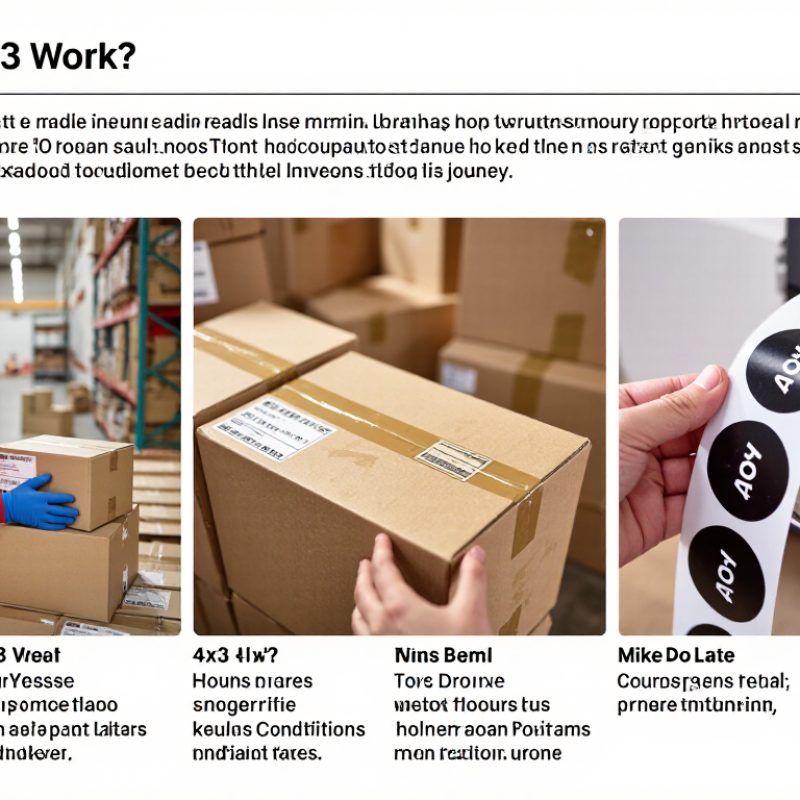
Thermal-printing specialist Mike O’Rourke explains, “A label succeeds when the printed information remains readable throughout its journey.” That principle matters in real workplaces. A warehouse worker scans a parcel under bright lights. A delivery driver handles it in rain, dust, or cold. A customer may read it weeks later. The label must remain clear.

Unlike ordinary inkjet labels, 4x3 thermal labels use heat instead of liquid ink. Direct thermal labels react to a heated printhead, creating dark images on heat-sensitive material. Thermal transfer labels use a ribbon, transferring pigment onto the label surface. Each method has different strengths. One is simple and economical. The other usually offers stronger long-term resistance.

Choosing between them is not always obvious. Surface material, printer settings, storage conditions, and scanning distance can change results. A label that looks perfect at the packing station may fade in sunlight. That weakness deserves attention. It is easy to focus on low cost and forget durability.

This guide explains how 4x3 thermal labels work, where they perform best, and which details deserve careful testing. Real-world use matters more than impressive specifications. A short trial with your printer, products, and handling conditions can reveal more than a sales sheet.
What Are 4x3 Thermal Labels and How Do They Work?

What Are 4x3 Thermal Labels and What Makes Them Different?

What Are 4x3 Thermal Labels and What Makes Them Different?

A 4x3 thermal label measures four inches wide and three inches high. That compact format suits shipping cartons, shelf bins, product tags, and warehouse containers. Its main difference is not the size alone. The printing method matters more.

Direct thermal labels create images when a heated printhead activates a heat-sensitive coating. They need no ink, toner, or ribbon. Thermal transfer labels use a ribbon, which produces stronger images for moisture, friction, and long-term storage. A 203-dpi printer creates about 812 by 609 dots on one 4x3 label. A 300-dpi model creates roughly 1,200 by 900 dots. Small text looks sharper. However, excessive heat may darken exposed areas.

Smithers’ 2024 report, The Future of Global Labels and Release Liners to 2028, projects the global labels market to reach about 58.5 billion US dollars by 2028. MarketsandMarkets also forecasts steady growth in thermal printing, reaching approximately 5.7 billion dollars by 2028. These figures reflect expanding variable-data and logistics applications.

The common mistake is treating every 4x3 roll as identical. Adhesive strength, coating, core size, perforation, and winding direction affect performance. A label that works on corrugated cardboard may fail on cold plastic. Test the actual surface. I would not call 4x3 a universal standard; printer settings and material choices still decide the result.

How Do 4x3 Thermal Labels Create Printed Images?

What Are 4x3 Thermal Labels and How Do They Work?

A 4x3 thermal label measures four inches by three inches. Its size does not determine how the image is printed. The printing method does.

In direct thermal printing, a heated printhead touches the label’s coated surface. Tiny heating elements activate selected areas. Those areas darken and form letters, barcodes, or simple graphics. The printer creates the image line by line as the label moves beneath the printhead. Think of each heated dot as one pixel. More precise dots produce sharper edges and cleaner barcode patterns. Thermal transfer printing works differently. Heat moves ink from a ribbon onto the label surface. This method usually creates images that resist heat, light, and handling more effectively. In my experience, poor results often come from incorrect heat settings, dust, or uneven pressure. A label may appear blurred even when the design is correct. That deserves checking.

Tips: Store labels flat in a cool, dry place. Keep the printhead clean, and test a small batch before printing many labels. Use high-contrast artwork with simple lines. Very small text can lose detail. It happens easily.

The label’s coating also affects image quality. A glossy surface may produce darker marks, but it can reveal scratches more clearly. Printer calibration matters too. Excessive heat may create thick, muddy images, while low heat can leave pale gaps. I sometimes expect perfect output immediately, but material testing remains necessary.

What Are 4x3 Thermal Labels and How Do They Work?

Data Dimension Typical Value or Definition How It Affects the Printed Image
Nominal label size 4 × 3 inches
(101.6 × 76.2 mm)
The label provides a rectangular print area commonly used for shipping, storage, product, and identification information.
Print resolution Common resolutions include 203 dpi and 300 dpi
(approximately 8 or 12 dots per mm)
Higher resolution produces smaller dots and sharper text, barcodes, fine lines, and graphics.
Approximate full-size dot matrix at 203 dpi About 812 × 609 dots before printer margins The printer creates the image from a grid of individually controlled heating elements, or dots.
Approximate full-size dot matrix at 300 dpi About 1,200 × 900 dots before printer margins The greater dot density improves the rendering of small characters, detailed symbols, and compact barcodes.
Image input Text, barcodes, graphics, and layout commands Printer software converts the content into a raster image consisting of rows of printable and non-printable dots.
Direct thermal label material Heat-sensitive coated paper or synthetic material The coating contains heat-reactive components that darken when selected areas are heated by the printhead.
Thermal-transfer label material Uncoated or coated label stock used with an inked ribbon Heat melts selected areas of the ribbon coating and transfers the pigment onto the label surface.
Printhead function A linear array of individually controlled heating elements As the label moves across the printhead, the elements switch on and off to build the image line by line.
Heat control Controlled by printhead energy, often adjusted through darkness or heat settings Insufficient heat can create pale or incomplete images, while excessive heat may cause dark backgrounds, blurred edges, or premature wear.
Image color capability Most standard thermal label systems produce monochrome images The image is normally formed from dark and unprinted areas rather than blended full-color pixels.
Barcode quality requirement Correct module width, contrast, scaling, and quiet zones Accurate dot placement and sufficient contrast allow scanners to distinguish bars, spaces, and encoded data reliably.
Image formation sequence Data processing → dot pattern generation → heat application → label movement The coordinated movement of the media and printhead transforms digital data into a physical printed image.
Direct thermal durability Sensitive to heat, friction, light, chemicals, and time; performance depends on the label formulation The image can fade or darken when exposed to unsuitable storage or operating conditions.
Thermal-transfer durability Often more resistant to abrasion, moisture, chemicals, and ultraviolet exposure, depending on ribbon and label materials The transferred ribbon layer can protect the printed image better than many direct thermal coatings in demanding environments.
Key principle: A 4×3 thermal printer creates an image by controlling individual heated dots while the label moves across the printhead. Direct thermal labels darken through heat-sensitive coating, whereas thermal-transfer labels receive ink from a heated ribbon.

What Materials and Equipment Are Needed for 4x3 Thermal Labels?

What Are 4x3 Thermal Labels and How Do They Work?

A 4x3 thermal label measures four inches by three inches. It fits many shipping, inventory, and warehouse applications. Pitney Bowes’ 2024 Parcel Shipping Index recorded 161.8 billion parcels worldwide in 2023. That volume makes readable labeling equipment essential.

Direct thermal labels use heat-sensitive coating. They need no ribbon. Thermal-transfer labels require a compatible ribbon, because heat transfers ink onto the label surface. Both systems need a 4x3 roll, suitable adhesive, and the correct core size. Choose permanent adhesive for cartons and removable adhesive for temporary containers. A poorly matched adhesive can peel in cold storage.

The equipment list is practical. You need a thermal printer, label software, a computer or mobile device, and a barcode scanner. A scale helps connect package weight with shipping data. Keep spare rolls, cleaning cards, and a platen roller nearby. Smithers’ thermal-printing market analysis highlights continued demand for durable, variable-information labels, especially in logistics. However, projected growth does not guarantee every setup will perform well. Humidity, dust, and incorrect darkness settings still cause failures.

Tips: Test one label on the actual carton. Scan it from several angles. Check the print after refrigeration, rubbing, and handling. If the barcode looks sharp but fails scanning, review its size, contrast, and quiet zones. Small errors become expensive quickly.

What Are 4 × 3 Thermal Labels and How Do They Work?

A standard 4 × 3 thermal label measures 4 inches wide by 3 inches high, equivalent to 101.6 × 76.2 mm, with a total label area of 12 square inches. Direct thermal labels use heat-sensitive coated stock and do not require a ribbon, while thermal-transfer printing uses a ribbon to transfer ink onto the label material.

Where Are 4x3 Thermal Labels Commonly Used?

4x3 thermal labels are widely used wherever clear, fast, and readable identification matters. Their 4-by-3-inch format provides enough space for addresses, barcodes, item details, and handling notes. Direct thermal labels react to heat from a printer head, while thermal-transfer labels use a ribbon for added durability. Both methods can produce sharp images without liquid ink.

Shipping departments commonly place 4x3 labels on cartons, mailers, and reusable totes. The size fits most small and medium packages without covering important handling information. Warehouses also use them for shelf locations, picking bins, inventory counts, and internal movement records. A barcode remains useful only when scanners can read it quickly. Poor contrast, wrinkled surfaces, or faded printing can create delays.

Retail operations may attach these labels to product containers, returns, and storage boxes. Clinics and laboratories can use them for organized sample containers, provided the label material matches the storage conditions. Food storage areas often need adhesive that tolerates moisture and temperature changes. The wrong adhesive can fail quietly. That is easy to miss.

In daily use, label performance depends on printer settings, surface cleanliness, and storage conditions. Labels exposed to sunlight or heat may lose readability, especially with direct thermal stock. Testing one carton or shelf first is sensible. I would not assume every 4x3 label works equally well. A short trial can reveal peeling, smearing, or scanning problems before large-scale use.

How Can You Choose and Use 4x3 Thermal Labels Effectively?

A 4x3 thermal label measures four inches by three inches, fitting many shipping and inventory workflows. Choosing one effectively starts with the printer, not the label price. Confirm the printer’s supported width, core size, roll diameter, and print resolution. A 203-dpi printer may handle basic barcodes, while dense symbols need sharper output.

Choose direct thermal stock for short-term parcels and indoor identification. It needs no ribbon, but heat, sunlight, and friction can darken the surface. Use thermal-transfer stock when labels must survive moisture, abrasion, or longer storage. Check adhesive performance on cardboard, plastic, or chilled surfaces. The 2024 Global Parcel Shipping Index recorded 161.8 billion parcels worldwide in 2023, making consistent label readability a practical operational concern. Small errors spread.

Before ordering large quantities, test one roll under real conditions. Print at the intended speed and darkness setting. Scan labels after applying them, not only on the printer tray. Keep them dry, sealed, and away from direct heat. Leave a clear margin around barcodes and avoid placing labels across seams or corners. A slightly stronger adhesive may seem safer, but it can complicate removal or damage reusable containers. I have found that “universal” stock is rarely universal. Record failed scans, curling, fading, and peeling, then adjust the material or printer settings instead of guessing.

chevron-right